Skip to content
REDStage Download
Stage piano & sampler · iPhone · iPad · Android

A stage piano in your pocket.

REDStage turns your phone or tablet into a professional stage instrument: a sampled grand piano, a tonewheel organ, an analog and FM synth and a sampler that opens your own libraries — with an infinite pad for worship, ten instant setups and MIDI over USB or Bluetooth.

Download on theApp StoreGet it onGoogle Play

Also for Mac & Windows → Buy the computer license

No account. No ads. No tracking. Works offline.

  • 4 engines
  • 88-key zones
  • Up to 256 voices
  • USB + Bluetooth MIDI
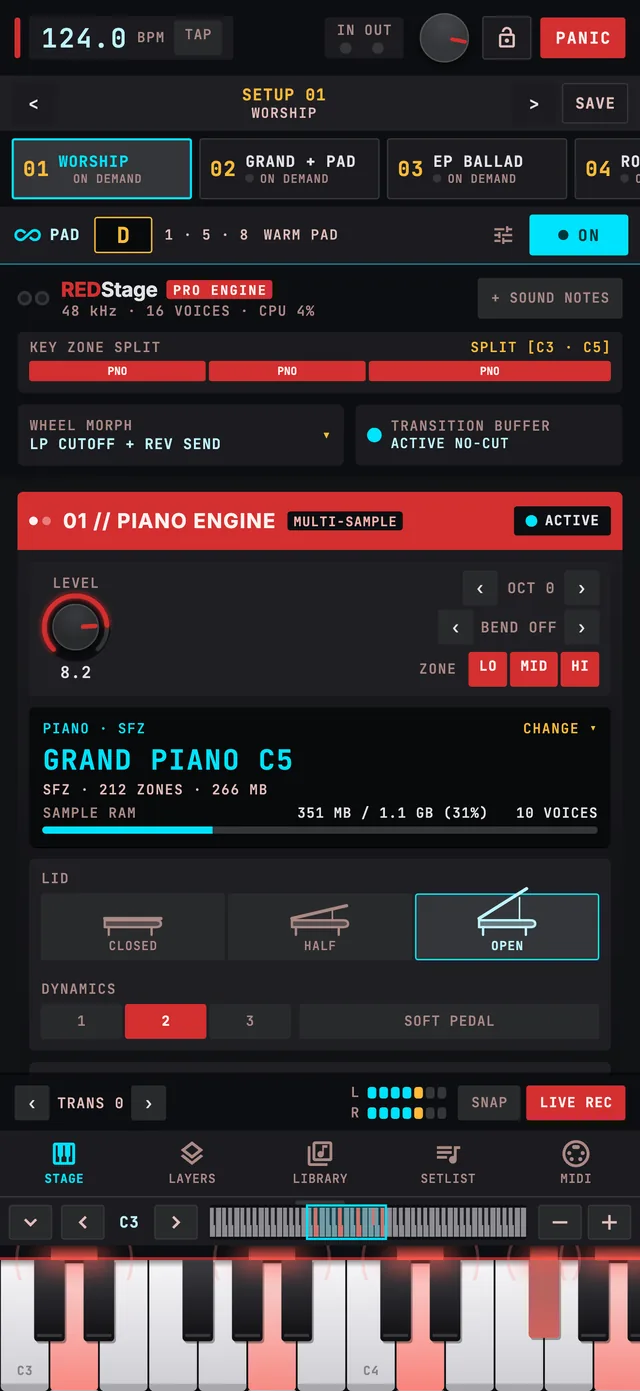
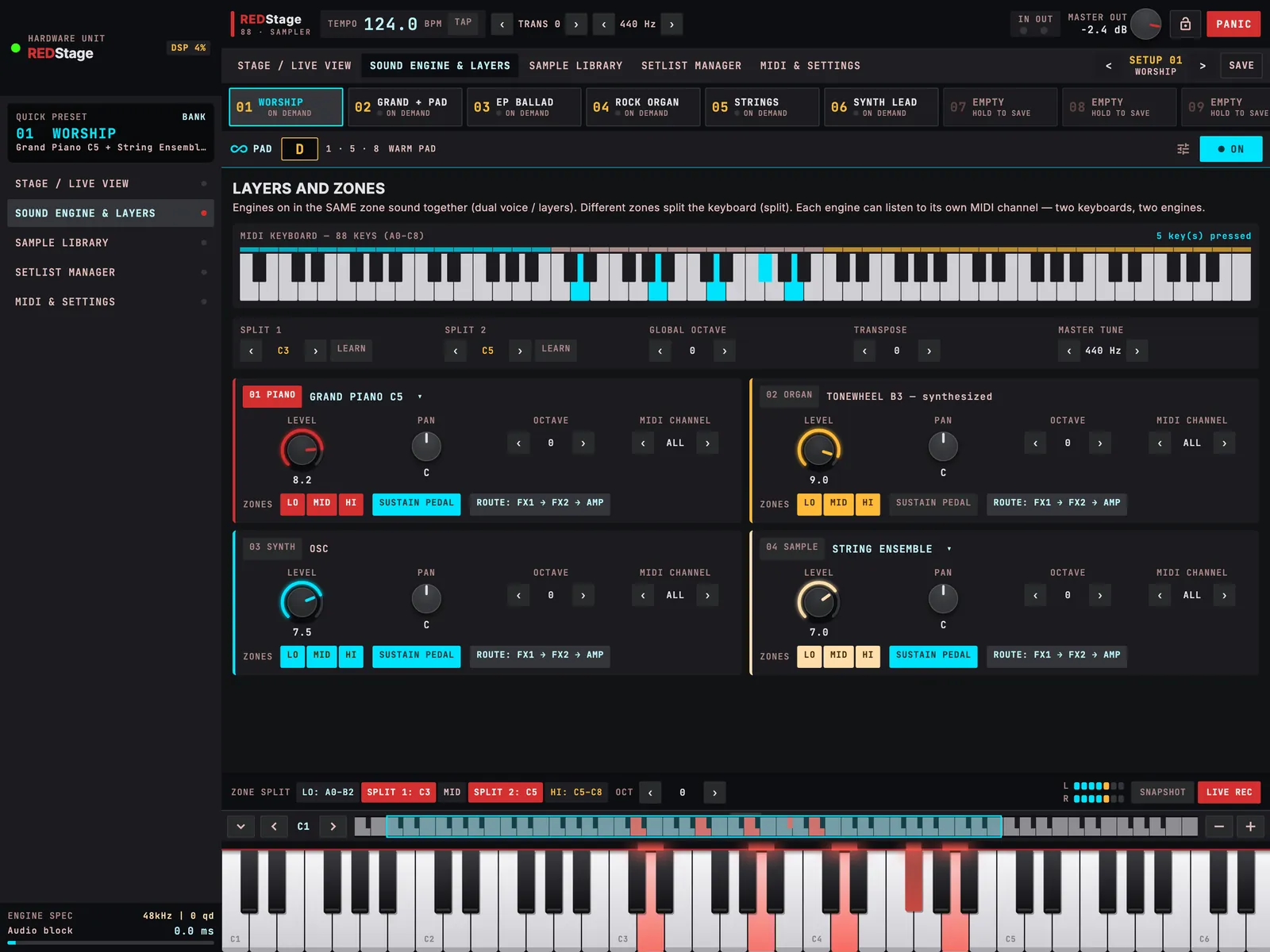
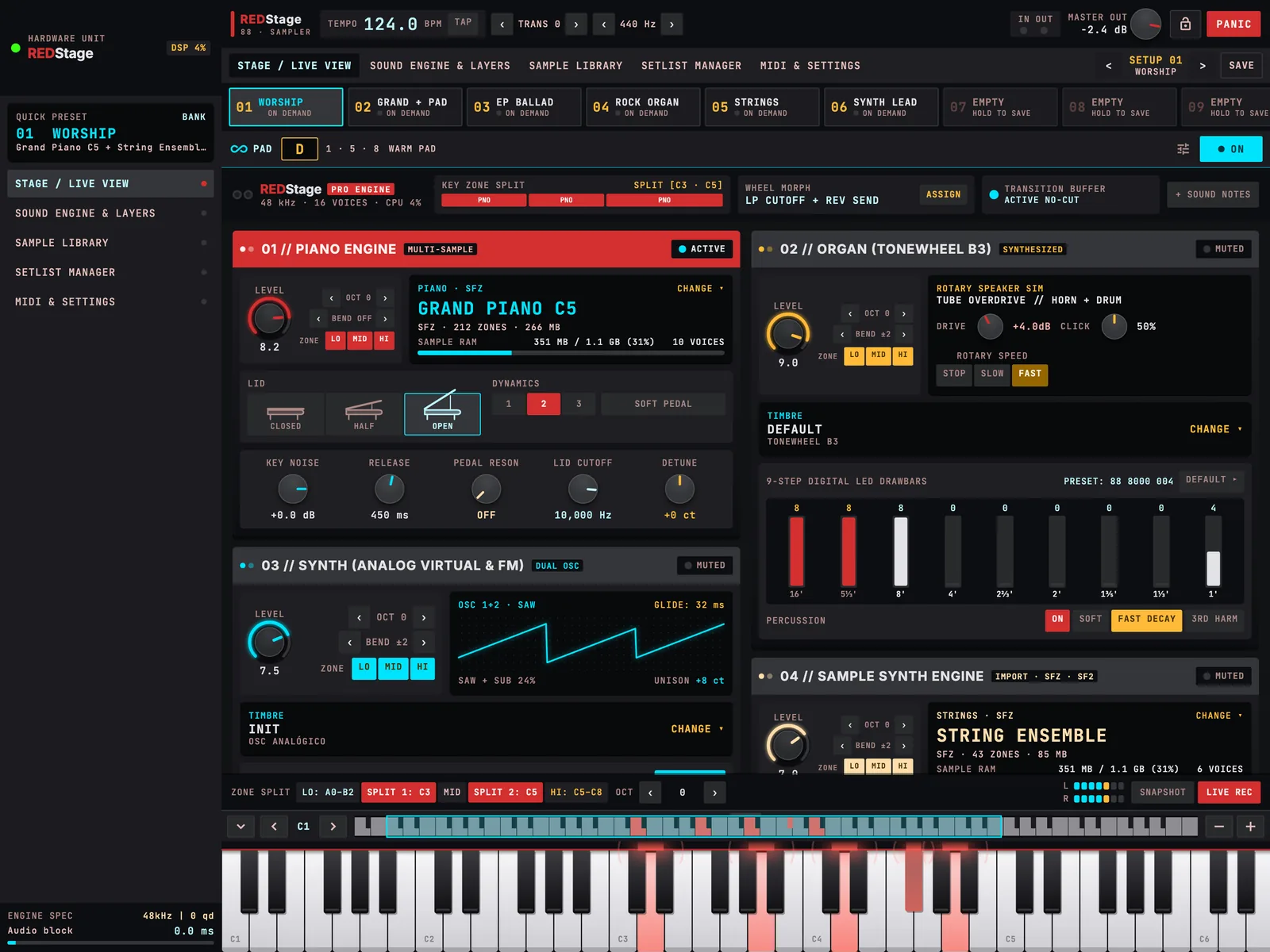
REDStage on iPad: the Stage view with the piano, organ, synth and sample engines and the on-screen keyboard
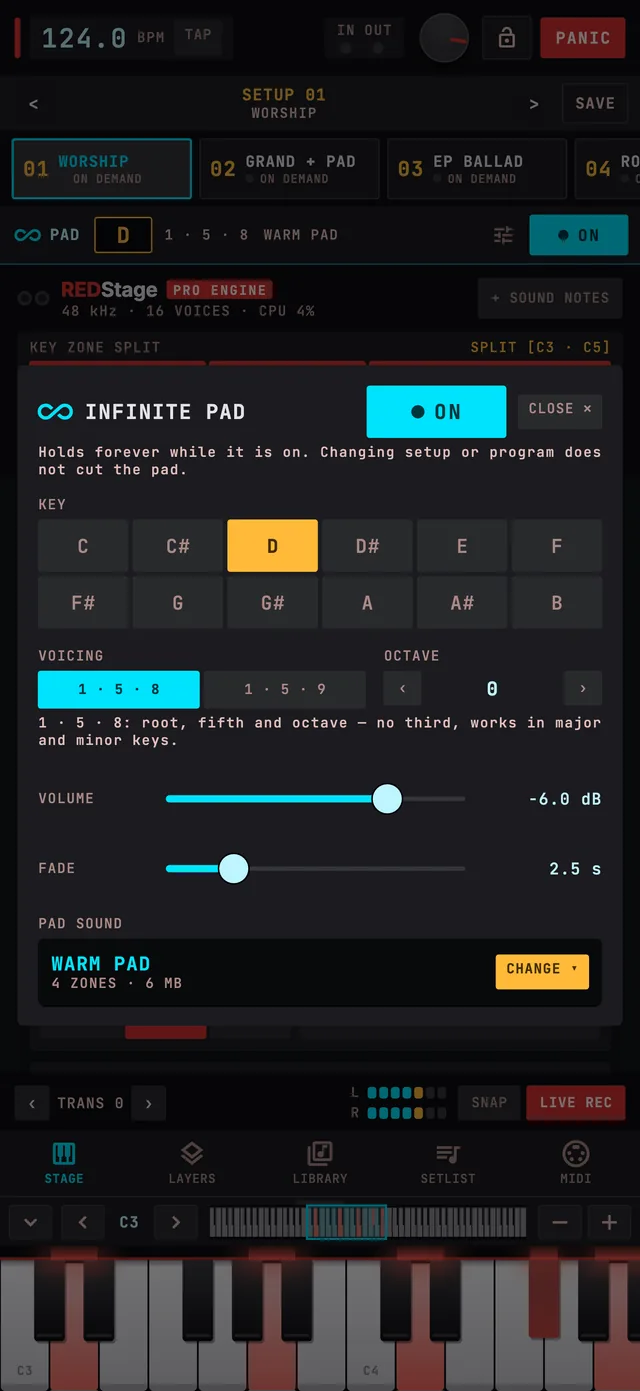
REDStage on iPhone: the Infinite Pad panel with the key, voicing, volume and fade controls
Play it here

Hear the grand piano before you install.

This is the Salamander Grand Piano, the same multi-sampled grand that ships inside REDStage. The app plays four velocity layers with resonance, half-pedal and a lid you can close; here you get one layer, straight from your browser.

01 // PIANO MULTI-SAMPLE
Grand Piano C5C4
Click or tap the keys — the nearer the front edge, the louder. On a computer, use the A–K row (W, E, T, Y, U for sharps).Salamander Grand Piano V3 by Alexander Holm — CC-BY 3.0
Four engines, one instrument

Everything a stage keyboard does. Layered, split and ready.

Each engine has its own level, octave, pitch-bend range, key zone and MIDI channel. Stack them on one key, split them across the keyboard, or send each one to a different controller.

01 //

Piano engine

Multi-sample

A sampled grand with the details you notice on stage: a lid you can open, half-open or close, sympathetic string resonance, damper felt noise on release, and a velocity curve you calibrate to your own touch.

  • Lid: open · half · closed, with cutoff
  • Continuous half-pedal, sostenuto, soft pedal
  • Pedal resonance & damper noise
  • Touch calibration in 12 notes
02 //

Organ engine

Tonewheel

A synthesized tonewheel organ with nine drawbars, percussion, key click, tube drive and a rotary speaker that speeds up and slows down like the real cabinet. Or load any sampled organ from your library.

  • 9 drawbars + 13 named registrations
  • Percussion: soft, fast decay, 3rd harmonic
  • Rotary: stop · slow · fast
  • Overdrive and click
03 //

Synth engine

Analog & FM

Two oscillators, sub, unison and glide for pads, leads and basses, an FM mode for electric pianos and bells, plus two sampled layers from 242 General MIDI sounds to blend strings or choir over your piano.

  • 15 ready-made synth sounds
  • Analog virtual + FM
  • 2 extra sampled layers
  • Up to 64 synth voices
04 //

Sample engine

Your library

Load any instrument you imported — strings, brass, choirs, your own recordings — with per-instrument volume, tuning, dynamics and release, and its own place on the keyboard.

  • SFZ, SF2/SF3, DecentSampler
  • WAV, AIFF, FLAC, OGG, MP3
  • Volume per zone and per sample
  • Crossfades and round-robin
Built for live

Change sounds mid-song. Nothing gets cut.

Ten setups sit at the top of every screen. Tap one and the next note is already the new sound — while the chord you are holding, the reverb tail and the delay keep ringing with the old one.

10 instant setups

Tap to call, hold to save and rename. Every engine, effect and layer in one touch.

No-cut switching

Held notes, reverb and delay tails finish naturally when the setup changes.

Setlist with notes

Put the show in order, step with Program Change and keep lyrics or cues on screen.

Panic & stage lock

One button silences everything; the lock stops accidental taps but keeps MIDI working.

MIDI out per sound

Each setup can send program and bank changes to your other keyboards and modules.

Follows your drummer

Incoming MIDI clock sets the tempo, and the delay locks to it.

REDStage on an iPhone held sideways, showing the setups bar and the Stage view
The Infinite Pad panel in REDStage, with the key D selected and the 1·5·8 voicing
∞ Infinite Pad

A worship pad that never runs out.

Pick the key of the song and the pad holds forever under every chord — root, fifth and octave (no third, so it fits major and minor), or the open add9 voicing. It fades in and out on its own timer and keeps playing when you change setups.

  • 12 keys, one tap each
  • 1·5·8 or 1·5·9 voicing
  • Fade in and out with the same time
  • Own volume, sound and octave
  • Survives setup and program changes
  • Panic stops it
Tap a key
1 · 5 · 8 — NotesD3 · A3 · D4
Your sound library

Bring the sounds you already own.

Import a folder, a ZIP or a single file. SFZ and SoundFont mappings come in whole — velocity layers, crossfades, loops, envelopes and controller modulation. Loose samples are mapped by their names (note, layer, round-robin).

  • SFZ
  • SF2
  • SF3
  • DecentSampler
  • WAV
  • AIFF
  • FLAC
  • OGG
  • MP3
  • ZIP
  • .ncw samples

Included in the app

Grand Piano C5

4 velocity layers · Salamander Grand Piano V3

CC-BY 3.0

Electric pianos

Reed electric, electric grand, vintage EP

CC-BY 3.0

String Ensemble

Looped sustain · VSCO-2 Community Edition

CC0

General MIDI

287 sounds · GeneralUser GS

Free license

Only import sounds you have the rights to use. Libraries you import stay on your device.

Inside the app

Every control where your hand expects it.

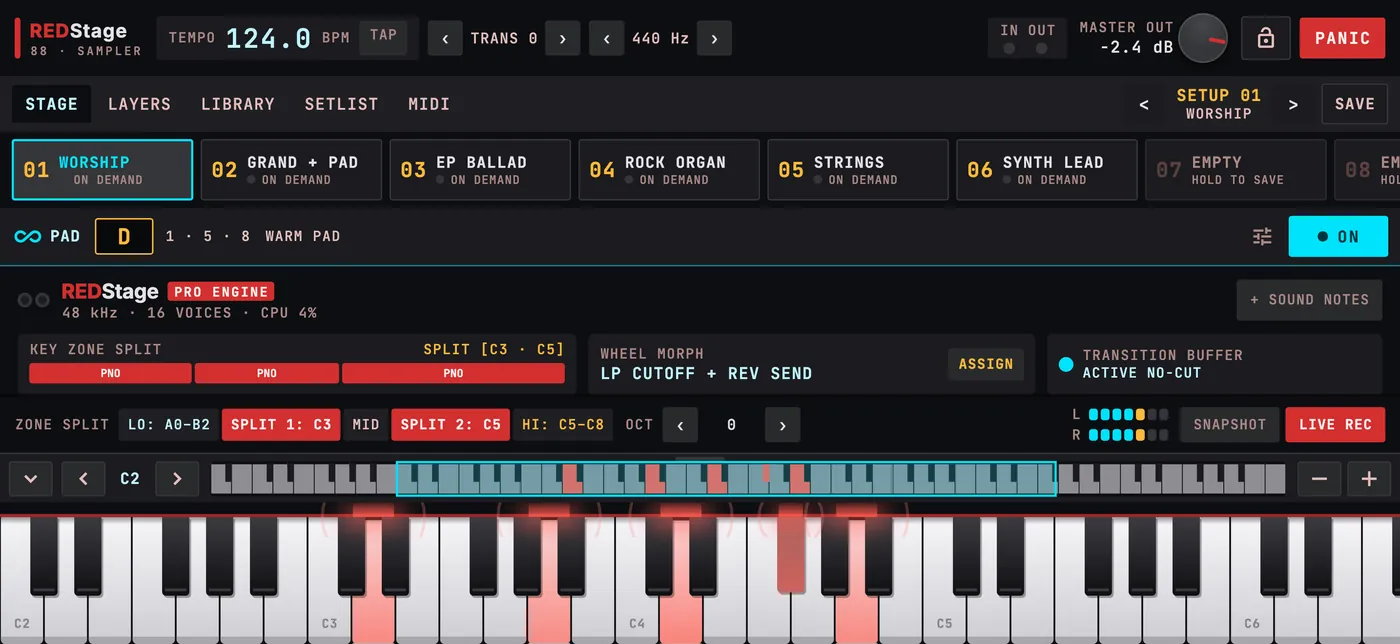
REDStage — Stage: The four engines, the zone split, the wheel assignment and the transition mode, on one screen.

The four engines, the zone split, the wheel assignment and the transition mode, on one screen.

MIDI & control

Plug in any keyboard. Or just play the screen.

USB MIDI

Class-compliant keyboards and controllers connect by themselves — no driver, no setup.

Bluetooth MIDI

Search, connect once, and your Bluetooth keyboard reconnects on its own next time.

On-screen keyboard

Resizable, multi-touch, with octave jump and an 88-key map. Where you touch the key sets the velocity.

MIDI learn & mixer

Tap ASSIGN, move a fader on your keyboard. CC and channel are both remembered, so zones never collide.

REDStage — Layers: Draw your split points on an 88-key map, set octaves, transpose and the master tune.
Under the hood

A real-time audio engine, written in C.

Real-time core

The audio thread never allocates or waits — the sound stays steady while you change screens.

Polyphony 32–256

You choose how many voices each sampler may use; stolen notes leave whole, never half a stereo pair.

Effects chain

FX1 → FX2 → amp → compressor → reverb → room EQ → limiter, with spill-over on every change.

Low latency

On Android it uses AAudio at the device’s native rate — about 30 ms of output latency measured on a 2019 mid-range phone. On iPhone it keeps playing with the screen locked.

Live recording

Record what you play to a WAV file, straight from the footer.

Three languages

English, Portuguese and Spanish. Panel terms stay the same in all three, like on hardware.

Questions

Before you download

Do I need a MIDI keyboard?

No. REDStage has a full on-screen keyboard you can resize and move across 88 keys. A USB or Bluetooth keyboard makes it a real stage instrument.

Which devices does it run on?

iPhone and iPad with iOS 15 or later, and Android phones and tablets with Android 7.0 or later. The layout adapts to phone, tablet, portrait and landscape.

Does it work without internet?

Yes. The built-in sounds live inside the app. Internet is only used when you choose to download a sound from the online catalog.

Can I use my own SFZ or SoundFont files?

Yes. Import a folder, a ZIP or single files: SFZ, SF2/SF3, DecentSampler, WAV, AIFF, FLAC, OGG and MP3. Imported sounds stay on that device.

Can I connect it to my computer or recording software?

You can record what you play to a WAV file inside the app and send program and bank changes to your other gear. On iPhone and iPad, other music apps can play REDStage through its own virtual MIDI port.

Do you collect my data?

No account, no ads, no analytics. Your setups, programs and imported sounds stay on your device. The privacy policy explains the few exceptions, like optional downloads.

Will it really not cut the sound when I change setups?

That is the default “active no-cut” mode: notes you are holding, reverb and delay tails finish with the old sound while new notes use the new one. You can switch to “cut on change” if you prefer.

Take the stage piano with you.

REDStage is coming to the App Store and Google Play.

Download on theApp StoreGet it onGoogle Play

Also for Mac & Windows → Buy the computer license